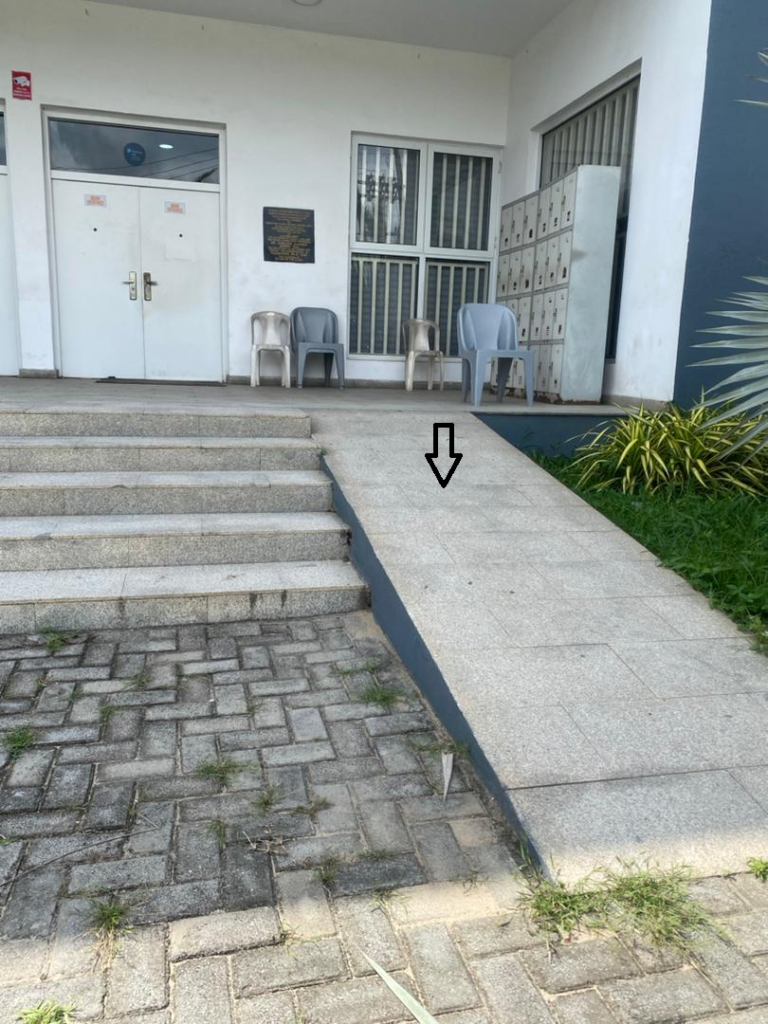
Have you ever noticed ramps beside staircases at building entrances, like the one in the image below? These ramps aren’t for aesthetics. They were designed to allow disabled individuals access to the building. Buildings with walkways structured like this are considered “accessible”, because they accommodate everyone, ensuring no one is left out.
Nowadays, a lot of interactions happen online. You can shop for groceries from the comfort of your home and get it delivered to you before the day is gone. Just like in physical spaces, our digital world needs to be accessible too. Digital accessibility means making sure websites and apps can be used by everyone.
WHAT IS WEB ACCESSIBILITY?
Web accessibility means designing and developing websites and apps to suit individuals of all kinds (disabled and abled). It ensures that users can perceive, understand, navigate, and interact with your digital content without experiencing challenges that may prevent users from accessing the information or services they need.
To understand how relevant web accessibility is in the digital world, let’s consider its importance:
- Legal Requirements: In countries like Israel and the United States of America, some laws and regulations require websites to be accessible. One of such law is the ADA (Americans with Disabilities) complaint law. Not complying with these regulations can lead to legal sanctions.
- Better User Experience: When navigation is easy to run through, text is readable, and the user interface is smooth, visitors to the site will have a user experience.
- SEO Benefits: Websites designed with accessibility in mind perform better in search engine rankings. Using descriptive text for images (alt text) and organizing content with appropriate heading levels help search engines understand and index your site more effectively.
ACCESSING YOUR CURRENT WEBSITE ACCESSIBILTY
Before making changes to your website’s accessibility, it’s important to
assess its current state. Here are some steps you can take to evaluate the accessibility of your website:
Step 1: Conduct an Accessibility Audit
You can use various tools and techniques to identify accessibility barriers and areas for improvement. Consider the following:
●Automated Tools: Use automated accessibility testing tools like WAVE, Axe, or Lighthouse to scan your website for common accessibility issues. These tools identify issues such as missing alt text, colour contrast problems, and keyboard navigation issues
● Manual Testing: While automated tools can catch many accessibility issues, some issues require manual testing. Manual testing involves simulating how users with disabilities might interact with your website and identifying any usability barriers they might encounter.
● User Testing: You can take your audit a step further by conducting usability testing with individuals who have disabilities. Gather first-hand feedback on their experience using your website. This can provide valuable insights into real-world accessibility issues that automated tools may no
Step 2: Review Accessibility Guidelines
Familiarize yourself with the Web Content Accessibility Guidelines (WCAG) published by the W3C. These guidelines provide a comprehensive set of criteria for making web content more accessible to people with disabilities. Reviewing the WCAG can help you understand the
specific requirements and best practices for accessibility. Then you can determine in what areas your website is falling short.
Step 3: Identify Priority Areas
Once you’ve completed your accessibility audit and reviewed the WCAG, prioritize the accessibility issues you’ve identified. Focus on addressing critical issues that impact the largest number of users or present significant barriers to access. Consider factors such as the severity of the issue, frequency of occurrence, and the potential impact on users.
Step 4: Create an Accessibility Action Plan
Based on your assessment and prioritization, develop a comprehensive accessibility action plan outlining the steps you’ll take to address accessibility issues on your website. Set clear goals, timelines, and responsibilities for implementing accessibility improvements. Your action plan should be flexible and adaptable to accommodate new insights and changes in priorities.
Step 5: Monitor and Iterate
Accessibility is an ongoing process, not a one-time task. Once you’ve implemented accessibility improvements, continue to monitor your website regularly for new accessibility issues and feedback from users. Iterate on your accessibility action plan based on new insights and evolving accessibility requirements.
PRINCIPLES OF WEBSITE ACCESSIBILITY
The foundation of web accessibility lies in four key principles developed by the World Wide Web Consortium (W3C) in a set of guidelines known as the Web Content Accessibility Guidelines (WCAG). These principles, often abbreviated as POUR, form the framework for creating accessible digital experiences. Let’s explore each principle in detail:
- Perceivable (P): Perceivable means that users must be able to perceive the information being presented. In other words, the content must be available to at least one of their senses (sight, hearing, touch) so that
they can access and understand it. Consequently, users with visual impairments, for example, must be able to access web content through other senses or enhanced visual means. - Operable (O): Operable means that users must be able to navigate and interact with the interface. Users may use different ways to interact, like using a keyboard or talking to the device. So, no matter how a user wants to use the website or app, it should work smoothly and be easy to use.
- Understandable (U): Understandable means that users should easily understand what they see on the website or app and know how to use it. It requires using clear language and making sure things work in a way
that users expect without feeling lost or frustrated. - Robust (R): Robust means that your web content is accessible to everyone, regardless of their choice of devices. This includes users who rely on assistive technologies like screen readers, screen magnifiers, or voice recognition software. The robust principle also guarantees that content will remain accessible as technologies evolve.
IMPROVING YOUR WEBSITE USING THE P.O.U.R PRINCIPLE
Now that you’ve assessed your website’s current accessibility status, it’s time to take action to improve it. Let’s explore how you can apply the POUR principles we have discussed earlier to improve the accessibility of your website.
Perceivable (P)
- Text Alternatives: Images and multimedia should have text descriptions (alt text) that screen readers can read aloud. Avoid generic descriptions like “Image01.jpg” and write clear, concise text that describes the content of the image. For instance, an image of a dog
would have an alt text like “Golden Retriever playing in the park.” - Colour Contrast: People with visual impairments may struggle to distinguish between text and background colours if the contrast is poor. Use a colour contrast checker to ensure your text is readable against the background.
- Captions: Videos should have captions so that users who are deaf or hard of hearing can read what is being said.
- Transcripts: Audio content should have transcripts that provide a written version of the spoken material.
Operable (O)
- Keyboard Accessibility: People with motor impairments may have difficulty using a mouse or other pointing device to interact with a website. Ensure your website allows users to navigate through all interactive elements (menus, buttons, links, forms) using just the keyboard. Users should also be able to navigate through the entire site using the Tab key to move forward and Shift+Tab to move backwards.
- Seizure Prevention: Be mindful of content that flashes rapidly (more than three times per second) as it can trigger seizures in users with photosensitive epilepsy. Instead, consider using animations without rapid flashing or provide a warning along with the option to pause or stop them.
- Navigation Aids: Provide clear and consistent navigation options to help users find content. Use a consistent layout for navigation menus across all pages.
Understandable (U)
- Readable Text: Use clear and simple language. Break up text into manageable chunks with headings, lists, and other formatting. Avoid jargon and use short, straightforward sentences.
- Predictable Navigation: Ensure that navigation is consistent and predictable. Avoid sudden changes in context. Links should clearly state their destination and buttons should indicate their action.
- Input Assistance: Provide help and suggestions for form inputs. Show clear error messages and instructions. Use placeholder text and instructions within forms to guide users.
Robust (R)
- Standards Compliance: Use valid, semantic HTML and follow web standards to ensure compatibility with different browsers and assistive technologies. Use proper HTML5 elements and attributes.
- Accessible Rich Internet Applications (ARIA) Landmarks: Use ARIA landmarks to improve navigation for users with screen readers. Mark up sections of the page using ARIA roles like role=”banner”, role=”navigation”, and role=”main”.
YOUR NEXT STEP
Congratulations on taking the first steps towards enhancing the accessibility of your website! Improving the accessibility of your website is not just a good thing, it’s simply the right thing to do. Remember that improving your website accessibility is a journey, not a destination. As your
website grows and evolves, revisit these principles and make sure new content adheres to accessibility best practices.