Categories
Career advice General Software Tech

10 Must-Have Skills for Job Ready Developers in 2025

Introduction

The labour market is consistently flooded with several tech talents quarterly and recruitment agencies failing to keep up with the rapidly evolving nature. Recruiters have gone beyond the common desirable skills in developers such as writing good codes, completing projects, and shipping products. 

Developers are no longer just coders; they are becoming pivotal players in shaping digital futures this means recruiters are looking for candidates who possess a blend of cutting-edge technical abilities and essential soft skills. But what are these in-demand skills, and how can developers stand out in a competitive job market?

Must-Have Skills for Developers in 2025

If you are out there, searching for your first job, planning to change jobs, or transitioning from a non-tech role to a more technical role. These skills will help you stand out as a candidate to beat the system and stay on top of the talent pool for recruiters to find you and your experience attractive.

  1. Ability to Communicate

A developer\’s ability to share or pass information simply and effectively is key, especially in remote work environments. The need for developers to be able to articulate ideas, provide updates, outline processes, and collaborate seamlessly across teams and different time zones is on the rise and you have to adapt to meet this need.

  1. Knowledge of Artificial Intelligence

The ability to use Artificial Intelligence and Machine Learning tools to build and deploy models and solutions within a fraction of the time is an essential skill. We are rapidly moving past the era of searching for ways to do things with Google and using Stackoverflow to find solutions. Developers who can build and deploy AI models, and work with frameworks, will be highly sought after in 2025.

  1. Management of Limited Resources

Being able to effectively manage time, projects, and limited resources efficiently is a key skill that recruiters seek when hiring developers. Most times in remote settings, developers would have to work on several projects with tight deadlines, your ability to prioritize tasks, meet deadlines, and ship products on time with little or no direct supervision will make recruiters want to hire you.

  1. Cloud Computing Experience

Having experience using cloud platforms like AWS, Azure, and Google Cloud will remain critical. According to a report from grandviewresearch.com, the cloud computing market is projected to grow from USD 602.31 billion in 2023 to USD 2,390,184 with a CAGR of 21.2%. This means more organizations are migrating to the cloud to streamline operations, improve agility, and unlock new levels of efficiency. As a developer, you need to focus more on understanding how to deploy products on the cloud and manage cloud services efficiently.

  1.  Version Control Tools

In a world where new versions of software and products are shipped out every second, gaining mastery of version control tools like Jenkins, GitLab, and GitHub is paramount to your success. Understanding continuous integration and continuous deployment (CI/CD) processes work is an added advantage in the hiring process.

  1. Debugging

Do you know how to use tools to identify and resolve code issues swiftly? It is not enough to know how to write clean code, what can you do when something goes wrong with the working code – this is a key area that recruiters aiming to know about you. Your ability to use debugging tools and techniques to maintain high code quality and quickly address any problems that arise will be tested during interviews and assessment tests. Knowing how to debug efficiently takes you from “it doesn’t work” to here is how I can make it work mentality.

  1. Ability to Extract Relevant Information

Your ability to quickly read, understand, and extract relevant information from large volumes of text and documentation is an essential commodity. This skill will help you as a developer to stay updated with trends and respond to changes in projects or technologies.

  1. Ability to Predict the Future

Having the foresight to know what will happen in the next 5 or 10 years in a particular industry or space is a great skill. It can be as simple as predicting what language or tool will become more useful in your skill – will allow you to anticipate future challenges and plan accordingly. This proactive approach helps prevent potential issues, so you can stay ahead of digital trends.

  1. Accountability

It is a common occurrence in remote and autonomous work environments, for employees to be unaccountable when it comes to completing tasks, meeting deadlines, and attending meetings to get the needed information on what to do. Recruiters want to hire developers who are not only good at what they do but also take responsibility for their tasks, outcomes, and continuous improvement.

  1. Keyboard Mastery

Your ability to be able to use keyboard shortcuts, and touch typing without having to look down and up while typing should be developed upon if it is currently low. Fast and accurate typing is an underrated but valuable skill for developers in this digital century. Mastering your keyboard shortcuts and efficient coding techniques can significantly boost productivity and save you tons of time.

You can measure your typing skills and improve your typing speed here

Current Job Openings for Developers

For more resources visit these links:

Why is this new direction important? 

Recruiters in the digital space are liaison agents between tech talents and companies. They find and assess job candidates through interviews and propose hiring suggestions based on the outcomes of those processes. Over the years they have become strategic talent scouts, exploring advanced tools like Applicant tracking systems (ATS), AI, and data analytics to find the perfect candidates. While they do so, the focus is not only on technical expertise; they want developers who can excel in and adapt quickly to changing environments.

Conclusion

Your success as a developer in 2025 is based on your ability to anticipate future work trends, understand the required technical and soft skills, and develop in those areas.

Now is the best time to refine these skills in communicating, making presentations, managing time and projects, and being accountable to stay competitive with the demands of the digital-first world.

Categories
General Software Tech

The Rise Of No-code And Low-code Development

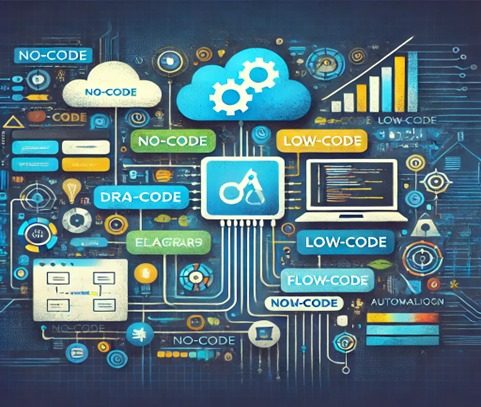
The primary goal of no-code and low-code platforms is to make the building process of software simpler and faster. These tools have been designed to minimize the necessity of extensive coding knowledge by making it quite easy for users to build applications with limited technical knowledge.

Right now, I am going to take you through the difference between No-code and Low-code platforms.

AI generated image

No-code Platforms

No-code platforms are tailored to users who have no programming knowledge. They leverage visual interfaces where users can design and build applications through drag-and-drop functionality. Essentially, no-code platforms abstract away the complexity of programming languages by providing pre-built components that can be assembled into fully functional applications.

No-code platforms allow users to create simple websites and mobile apps to complex business process automation tools and even Customer Relationship Management (CRM) systems. Popular examples include Wix, Bubble, and Airtable.

Low-code Platforms

Low-code platforms target the user who perhaps can understand coding or at least feel comfortable writing a small amount of code. These tools offer more flexibility than no-code options but still greatly reduce how much code needs to be written in application development.

Low-code platforms do support faster development compared to traditional coding; at the same time, they provide an drag-and-drop interface for easy design, while also allowing developers to create custom code for more advanced functionality. Examples of low-code platforms include OutSystems, Mendix, and Microsoft Power Apps.

While no-code platforms are targeted at non-technical users exclusively, in the case of low-code platforms, both technical and non-technical users have a wider scope for complexity and customization with the possibility of rapid development.

Why Are No-code and Low-code Platforms Gaining Popularity?

1. Shortage of Developers: One of the main reasons for the increasing interest in no-code and low-code platforms is the continuous shortage of professional developers. While the demand for tailor-made software and digital solutions grows, it is increasingly hard for businesses to fill in developer positions. According to LinkedIn, there is a huge gap in technological skills, and companies cannot find candidates for software developer positions.

No-code and low-code platforms alleviate this problem by making non-technical resources, popularly known as “citizen developers,” perform the tasks of app development. In other words, no-code and low-code platforms free business teams from the bondage of depending on IT departments or outsourcing agencies to develop applications for their specific needs. This is a big plus for SMBs that cannot afford to have full-time developers on their payrolls.

2. Faster Time-to-Market: In today’s fast-paced business environment, the ability to get products and solutions to market quickly is more important than ever. Traditional development cycles can take months or even years, especially for large-scale projects. No-code and low-code platforms dramatically shorten the development timeline, enabling businesses to create and deploy apps in a fraction of the time.

This speed is particularly valuable for startups and businesses in competitive industries looking to move as fast as possible to stay ahead of the curve. By embracing no-code and low-code platforms, these businesses can iterate and adapt more quickly-testing and refining ideas with minimal risk.

3. Cost Efficiency: Building custom software traditionally involves hiring a team of developers, designers, and project managers. These development projects tend to be expensive, and the costs can easily add up. No-code and low-code development platforms reduce the requirement for large teams, thus cutting down some of the costs related to app development.

No-code and low-code platforms are cost-effective methods for businesses to implement simple applications or develop internal tools. Beyond reduced development costs, the benefits also include lower maintenance expenses, since apps built on such platforms are typically easier to manage and update.

4. Agility and Flexibility: The fast-changing landscape of modern business demands solutions that can be quickly adapted and updated. No-code and low-code platforms offer businesses the agility to make changes in real-time, whether it’s adding new features, fixing bugs, or updating content.

Because these platforms allow users to change and develop applications without having to wait for extensive development cycles, businesses can quickly adapt to market conditions, customer needs, or internal demands. This level of flexibility means that companies can stay competitive, no matter how fast things change.

5. Empowering Non-Technical Users: No-code and low-code development platforms makes it possible for business professionals, marketers, and other employees to be directly involved in contributing to the development process of an application, hence reducing bottlenecks and allowing the business to scale up their operations with no sole dependency on IT.

No-code and low-code platforms provide the tools to the business users to build their own apps. Therefore, it fosters the collaboration of technical and non-technical teams. In turn, all of this builds up a more agile and responsive development process driven by real-world business needs.

Challenges and Considerations

Despite their many advantages, no-code and low-code platforms do not come without challenges and limitations.

  1. Scalability: While no-code and low-code platforms are great for small to medium-sized projects, they’re not always the right solution for enterprise-scale applications. Apps built on these platforms can start to encounter performance issues or struggle to scale with growing demand.
  2. Security and Compliance: All software applications are concerned with security, and no-code and low-code platforms are no exception. While some platforms offer robust security features, they may not meet the same rigorous standards as custom-built applications. For industries with strict compliance requirements (e.g., healthcare, finance), it’s important to thoroughly vet the platform to ensure it adheres to industry regulations.
  3. Limited Customization: Low-code platforms are more customisable than no-code platforms, but low-code platforms can be limited in one way or another. For instance, users may have very specific or complex features that require implementation beyond the capacity of the platform. In such cases, the development process may demand more specialised knowledge or may not be possible at all.
  4. Vendor lock-in: Many of the no-code and low-code platforms are proprietary, meaning the application built on such a platform is often tied to the vendor’s ecosystem. If you ever want to switch to another tool or migrate your app to traditional ways of development, it will be a cumbersome and painful process. To mitigate this risk, businesses should carefully evaluate platform options and consider long-term scalability before fully committing to a particular tool.

The Future of No-code and Low-code Development

The future of no-code and low-code development looks very bright. As these platforms continue to evolve, they will get much more powerful, flexible, and user-friendly. With the improvements in artificial intelligence (AI) and machine learning (ML), we are bound to see no-code and low-code platforms embed much more intelligent automation for much faster and more efficient development.

Moreover, as demand for software applications widens among various industries, no-code and low-code development platforms are positioned to further become highly instrumental in supporting business growth and innovation without requiring large teams of developers.

In the next few years, the future for no-code and low-code tools is probably in addition to usage by citizen developers, integration in enterprise software systems that will allow for hybrid development approaches whereby business teams will develop alongside IT professionals to create such powerful applications.

Conclusively, no-code and low-code platforms provide something for everyone-from entrepreneurs trying to develop their first app, corporate professionals who want to automate some process, all the way to a developer trying to get faster development lifecycles. Understanding the advantages, challenges, and future potential of these platforms gives companies the capability to leverage them to the fullest and shapes the path towards more agile and innovative software development.

Categories
General How-Tos Software Tech

Creating Custom React Hooks – Oyinkansola Odunsi

If you’re not new to React, you probably know about or have used hooks like useState and useEffect before. However, do you know that you can create your own hook? Yes, you heard that right! And this is what this article is about. 

Also, if you’re a newbie to JavaScript library, I’ve got you covered! I’ll bring you up to speed on the existing React hooks, and help you understand how to create yours. Let’s dive right in.

WHAT ARE REACT HOOKS?

The React library is commonly used because it’s easy to handle. One of this library’s excellent functionalities is React hooks. In simple terms, React hooks are JavaScript functions that allow you to access state and other React features without writing a class. 

These functions can also used to isolate the reusable parts of functional components. Additionally, they are identified by the word use, followed by the superpowers they possess like DebugValue, Effect, Callback, and LayoutEffect

THE EXISTING REACT HOOKS

The latest React version (version 18) has 15 built-in hooks that you can use. The most commonly used hooks are useState, useEffect, and useContext. Here is a list and a summary of all the existing React hooks:

  1. useCallback: Returns a memoized (stored to avoid repeated computation) callback function so that the child component that depends on the function will not re-render unnecessarily. The function will only be recreated if one of its dependencies changes.  
  2. useContext: After creating a context, useContext allows you to use a value in the context further down in your functional components. So, you don’t have to manually pass props down your component tree. 
  3. useDebugValue: Helps you label the output of your custom hooks so you can easily understand their state and monitor their behaviour in React DevTools.
  4. useDeferredValue: Useful for prioritizing the responsiveness of your user interface by deferring long-running operations that might affect the performance of your application.
  5. useEffect: This hook handles side effects in your functional components. Side effects include fetching data, setting up event listeners, and DOM manipulation. 
  6. useId: Helps you generate unique IDs across your React application.
  7. useImperativeHandle: Allows you to specify the properties of a component that should be exposed when using refs.
  8. useInsertionEffect: This makes it easy for you to execute a function after a component has been added to the DOM.
  9. useLayoutEffect: It works similarly to useEffect, but it’s synchronous. You can use it to make changes on your DOM immediately when it’s updated, and before the browser displays content on a user’s screen. 
  10. useMemo: It is used to memoize the result of expensive computations to avoid unnecessary recalculations.
  11. useReducer: Instead of using useState you can use useReducer to handle more complex state logic within a functional component.
  12. useRef: Helps you create mutable references that you can access across multiple renders of a functional component. 
  13. useState: Allows you to manage the state within a functional component.
  14. useSyncExternalStore: This hook allows you to read and subscribe to an external data store.
  15. useTransition: Helps you manage asynchronous updates to a React application’s UI.

WHY DO WE NEED CUSTOM HOOKS?

Don’t get me wrong, this article is not to say that the in-build React hooks are not sufficient. React has all these powerful hooks that will serve you well. Nonetheless, I can’t deny the reality that custom hooks can greatly improve the readability and overall quality of your code.

Let’s open up this fact a little bit by highlighting why you might need a custom hook:

  • It makes logic reusable.
  • It allows you to use other hooks provided by React.
  • You can easily separate your logic from your UI.
  • You can break down complex stateful logic into simple chunks of code that are easy to maintain.
  • You can test specific parts of your stateful logic because custom hooks can be debugged in isolation.

TIPS FOR CREATING CUSTOM REACT HOOKS

Here are some tips to keep in mind to ensure your custom hooks are flexible, reusable, and easy to understand.

  • Follow the naming convention by starting with use.
  • Repeated/reusable logic within your components should be your custom hooks candidates.
  • Feel free to use the built-in React hooks where necessary.
  • Make sure a hook is focused on one responsibility instead of multiple functions.
  • Your hooks should have value or functions that components can use.
  • Ensure your hooks can accept parameters so you can easily customize their behaviour.
  • Test your hooks in different scenarios to ensure they are performing as expected. You can use tools like Jest and/or the React Testing Library.
  • Document your hook and succinctly explain its function.

CREATING YOUR FIRST CUSTOM HOOK

Step 1: Define Your Hook

Let’s create a custom React hook that would allow our application toggle between light and dark mode (our reusable logic). To begin, we create a JavaScript file to define our hook.

import { useState, useEffect } from 'react';
function useDarkMode() {
  const [isDarkMode, setIsDarkMode] = useState(false);
  useEffect(() => {
    const body = document.body;
    if (isDarkMode) {
      body.classList.add('dark-mode');
    } else {
      body.classList.remove('dark-mode');
    }
  }, [isDarkMode]);
const toggleDarkMode = () => {
    setIsDarkMode(prevMode => !prevMode);
  };
  return [isDarkMode, toggleDarkMode]:
}
export default useDarkMode;

Step 2: Use Your Custom Hook

Now, we can use our custom hook in our React component.

import React from 'react';
import useDarkMode from './useDarkMode';
function App() {
  const [isDarkMode, toggleDarkMode] = useDarkMode();
  return (
    <div className="App">
      <button onClick={toggleDarkMode}>
        Toggle Dark Mode
      </button>
      <div className={isDarkMode ? 'dark-mode' : 'light-mode'}>
        {isDarkMode ? 'Dark Mode' : 'Light Mode'}
      </div>
    </div>
  );
}
export default App;

Step 3: Test Your Hook

To carry out the test, you’ll have to install the Jest and the React Testing Library using:

npm install --save-dev @testing-library/react @testing-library/jest-dom jest

Then, we’ll create a test file for our custom hook. Let’s call it useDarkMode.test.js.

We’ll proceed to use the renderHook and act utilities in our React Testing Library to test our hook.

import { renderHook, act } from '@testing-library/react-hooks';
import useDarkMode from './useDarkMode';


describe('useDarkMode', () => {
  test('should toggle dark mode correctly', () => {
    const { result } = renderHook(() => useDarkMode());
    // Initial state should be light mode (isDarkMode: false)
    expect(result.current[0]).toBe(false);
    expect(document.body.classList.contains('dark-mode')).toBe(false);
    // Toggle to dark mode
    act(() => {
      result.current[1](); // toggleDarkMode
    });
    expect(result.current[0]).toBe(true);
    expect(document.body.classList.contains('dark-mode')).toBe(true);
    // Toggle back to light mode
    act(() => {
      result.current[1](); // toggleDarkMode
    });
    expect(result.current[0]).toBe(false);
    expect(document.body.classList.contains('dark-mode')).toBe(false);
  });
});

Next, add Jest to your package.json file as follows, then run npm test to confirm that the useDarkMode hook is running as expected:

"scripts": {
  "test": "jest"
}

Step 4: Document Your Custom Hook

Document how your custom hook works and include details like its parameters and return values.

CREATING A DATA FETCHING CUSTOM HOOK

Now that you have an idea of how to create a custom React hook, let’s build another common custom hook (a data fetching hook) to further reinforce our knowledge. Shall we?

Step 1: Create the hook.

We’ll call it useFetch.js. This custom hook is commonly used to allow several components to fetch data from an API.

import { useState, useEffect } from 'react';


function useFetch(url) {
  const [data, setData] = useState(null);
  const [loading, setLoading] = useState(true);
  const [error, setError] = useState(null);


  useEffect(() => {
    const fetchData = async () => {
      setLoading(true);
      try {
        const response = await fetch(url);
        if (!response.ok) {
          throw new Error('Network response was not ok');
        }
        const data = await response.json();
        setData(data);
      } catch (error) {
        setError(error);
  } finally {
        setLoading(false);
      }
    };
    fetchData();
  }, [url]);


  return { data, loading, error };
}
export default useFetch;

Step 2: Use your new hook in a component.

import React from 'react';
import useFetch from './useFetch';
function App() {
  const { data, loading, error } = useFetch('https://api.google.com/data');
  if (loading) return <div>Loading...</div>;
  if (error) return <div>Error: {error.message}</div>;
  return (
    <div>
      <h1>Data:</h1>
      <pre>{JSON.stringify(data, null, 2)}</pre>
    </div>
  );
}
export default App;

Step 3: Test and document your custom hook.

import { renderHook } from '@testing-library/react-hooks';
import useFetch from './useFetch';
// Mock the fetch function
global.fetch = jest.fn(() =>
  Promise.resolve({
    ok: true,
    json: () => Promise.resolve({ data: 'mocked data' }),
  })
);
describe('useFetch', () => {
  afterEach(() => {
    fetch.mockClear();
  });
  it('should return data after fetch', async () => {
    const { result, waitForNextUpdate } = renderHook(() => useFetch('https://api.example.com/data'));
    expect(result.current.loading).toBe(true);
    await waitForNextUpdate();
    expect(result.current.loading).toBe(false);
    expect(result.current.data).toEqual({ data: 'mocked data' });
    expect(result.current.error).toBe(null);
  });
  it('should return an error if fetch fails', async () => {
    fetch.mockImplementationOnce(() =>
      Promise.reject(new Error('Fetch failed'))
    );
    const { result, waitForNextUpdate } = renderHook(() => useFetch('https://api.example.com/data'));
    await waitForNextUpdate();
    expect(result.current.loading).toBe(false);
    expect(result.current.error).toBe('Fetch failed');
    expect(result.current.data).toBe(null);
  });
});

GET STARTED TODAY

By leveraging the power of custom hooks, you’ll be able to write simple,  maintainable and readable codes. And trust me, once you get started, you are locked in by the ease these functions bring to your programming journey.

Categories
Best practices General Software Tech

How To Improve Your Website Accessibilty – Victoria Nduka

Have you ever noticed ramps beside staircases at building entrances, like the one in the image below? These ramps aren’t for aesthetics. They were designed to allow disabled individuals access to the building. Buildings with walkways structured like this are considered “accessible”, because they accommodate everyone, ensuring no one is left out.

Nowadays, a lot of interactions happen online. You can shop for groceries from the comfort of your home and get it delivered to you before the day is gone. Just like in physical spaces, our digital world needs to be accessible too. Digital accessibility means making sure websites and apps can be used by everyone.

WHAT IS WEB ACCESSIBILITY?

Web accessibility means designing and developing websites and apps to suit individuals of all kinds (disabled and abled). It ensures that users can perceive, understand, navigate, and interact with your digital content without experiencing challenges that may prevent users from accessing the information or services they need.

To understand how relevant web accessibility is in the digital world, let’s consider its importance:

  1. Legal Requirements: In countries like Israel and the United States of America, some laws and regulations require websites to be accessible. One of such law is the ADA (Americans with Disabilities) complaint law. Not complying with these regulations can lead to legal sanctions.
  2. Better User Experience: When navigation is easy to run through, text is readable, and the user interface is smooth, visitors to the site will have a user experience.
  3. SEO Benefits: Websites designed with accessibility in mind perform better in search engine rankings. Using descriptive text for images (alt text) and organizing content with appropriate heading levels help search engines understand and index your site more effectively.

ACCESSING YOUR CURRENT WEBSITE ACCESSIBILTY

Before making changes to your website’s accessibility, it’s important to
assess its current state. Here are some steps you can take to evaluate the accessibility of your website:

Step 1: Conduct an Accessibility Audit

You can use various tools and techniques to identify accessibility barriers and areas for improvement. Consider the following:

Automated Tools: Use automated accessibility testing tools like WAVE, Axe, or Lighthouse to scan your website for common accessibility issues. These tools identify issues such as missing alt text, colour contrast problems, and keyboard navigation issues
Manual Testing: While automated tools can catch many accessibility issues, some issues require manual testing. Manual testing involves simulating how users with disabilities might interact with your website and identifying any usability barriers they might encounter.
User Testing: You can take your audit a step further by conducting usability testing with individuals who have disabilities. Gather first-hand feedback on their experience using your website. This can provide valuable insights into real-world accessibility issues that automated tools may no

Step 2: Review Accessibility Guidelines

Familiarize yourself with the Web Content Accessibility Guidelines (WCAG) published by the W3C. These guidelines provide a comprehensive set of criteria for making web content more accessible to people with disabilities. Reviewing the WCAG can help you understand the
specific requirements and best practices for accessibility. Then you can determine in what areas your website is falling short.

Step 3: Identify Priority Areas

Once you’ve completed your accessibility audit and reviewed the WCAG, prioritize the accessibility issues you’ve identified. Focus on addressing critical issues that impact the largest number of users or present significant barriers to access. Consider factors such as the severity of the issue, frequency of occurrence, and the potential impact on users.

Step 4: Create an Accessibility Action Plan

Based on your assessment and prioritization, develop a comprehensive accessibility action plan outlining the steps you’ll take to address accessibility issues on your website. Set clear goals, timelines, and responsibilities for implementing accessibility improvements. Your action plan should be flexible and adaptable to accommodate new insights and changes in priorities.

Step 5: Monitor and Iterate

Accessibility is an ongoing process, not a one-time task. Once you’ve implemented accessibility improvements, continue to monitor your website regularly for new accessibility issues and feedback from users. Iterate on your accessibility action plan based on new insights and evolving accessibility requirements.

PRINCIPLES OF WEBSITE ACCESSIBILITY

The foundation of web accessibility lies in four key principles developed by the World Wide Web Consortium (W3C) in a set of guidelines known as the Web Content Accessibility Guidelines (WCAG). These principles, often abbreviated as POUR, form the framework for creating accessible digital experiences. Let’s explore each principle in detail:

  1. Perceivable (P): Perceivable means that users must be able to perceive the information being presented. In other words, the content must be available to at least one of their senses (sight, hearing, touch) so that
    they can access and understand it. Consequently, users with visual impairments, for example, must be able to access web content through other senses or enhanced visual means.
  2. Operable (O): Operable means that users must be able to navigate and interact with the interface. Users may use different ways to interact, like using a keyboard or talking to the device. So, no matter how a user wants to use the website or app, it should work smoothly and be easy to use.
  3. Understandable (U): Understandable means that users should easily understand what they see on the website or app and know how to use it. It requires using clear language and making sure things work in a way
    that users expect without feeling lost or frustrated.
  4. Robust (R): Robust means that your web content is accessible to everyone, regardless of their choice of devices. This includes users who rely on assistive technologies like screen readers, screen magnifiers, or voice recognition software. The robust principle also guarantees that content will remain accessible as technologies evolve.

IMPROVING YOUR WEBSITE USING THE P.O.U.R PRINCIPLE

Now that you’ve assessed your website’s current accessibility status, it’s time to take action to improve it. Let’s explore how you can apply the POUR principles we have discussed earlier to improve the accessibility of your website.

Perceivable (P)

  1. Text Alternatives: Images and multimedia should have text descriptions (alt text) that screen readers can read aloud. Avoid generic descriptions like “Image01.jpg” and write clear, concise text that describes the content of the image. For instance, an image of a dog
    would have an alt text like “Golden Retriever playing in the park.”
  2. Colour Contrast: People with visual impairments may struggle to distinguish between text and background colours if the contrast is poor. Use a colour contrast checker to ensure your text is readable against the background.
  3. Captions: Videos should have captions so that users who are deaf or hard of hearing can read what is being said.
  4. Transcripts: Audio content should have transcripts that provide a written version of the spoken material.

Operable (O)

  1. Keyboard Accessibility: People with motor impairments may have difficulty using a mouse or other pointing device to interact with a website. Ensure your website allows users to navigate through all interactive elements (menus, buttons, links, forms) using just the keyboard. Users should also be able to navigate through the entire site using the Tab key to move forward and Shift+Tab to move backwards.
  2. Seizure Prevention: Be mindful of content that flashes rapidly (more than three times per second) as it can trigger seizures in users with photosensitive epilepsy. Instead, consider using animations without rapid flashing or provide a warning along with the option to pause or stop them.
  3. Navigation Aids: Provide clear and consistent navigation options to help users find content. Use a consistent layout for navigation menus across all pages.

Understandable (U)

  1. Readable Text: Use clear and simple language. Break up text into manageable chunks with headings, lists, and other formatting. Avoid jargon and use short, straightforward sentences.
  2. Predictable Navigation: Ensure that navigation is consistent and predictable. Avoid sudden changes in context. Links should clearly state their destination and buttons should indicate their action.
  3. Input Assistance: Provide help and suggestions for form inputs. Show clear error messages and instructions. Use placeholder text and instructions within forms to guide users.

Robust (R)

  1. Standards Compliance: Use valid, semantic HTML and follow web standards to ensure compatibility with different browsers and assistive technologies. Use proper HTML5 elements and attributes.
  2. Accessible Rich Internet Applications (ARIA) Landmarks: Use ARIA landmarks to improve navigation for users with screen readers. Mark up sections of the page using ARIA roles like role=”banner”, role=”navigation”, and role=”main”.

YOUR NEXT STEP

Congratulations on taking the first steps towards enhancing the accessibility of your website! Improving the accessibility of your website is not just a good thing, it’s simply the right thing to do. Remember that improving your website accessibility is a journey, not a destination. As your
website grows and evolves, revisit these principles and make sure new content adheres to accessibility best practices.

Categories
Career advice Software

Top 5 Data Analyst Skills in 2023

As a data analyst expert or newbie, have you ever wondered how you can stay relevant in the 2023 job market with the skills you currently have?

In this article, we’ll provide you with the top 5 must-have skills every data analyst should get familiar with or even more familiar with — if you already know it — in 2023.

Aside helping organizations employ business data to make profitable and accurate decisions, a data analyst should also be able to visualize data and give expert reports on how this data can

To stay on course, here are top 5 skills you should stick with as a data professional in 2023.

Top 5 Data Analyst Skills in 2023

  1. Spreadsheet Proficiency

Microsoft Excel is that tool for data cleaning and analytical activities, like mini data cleaning and exploration, simple interactive dashboards with pivot charts, and even advanced Excel using VBA to automate the analytical process. If you are a data noob, Excel is a perfect catch as you can manipulate and analyze data without knowing how to use programming technologies like R or Python. 

  1. SQL and Database Management 

SQL or Structured Query Language is crucial for interacting with the database. It handles large data sizes that spreadsheets can’t handle (e.g., billions of rows).

Analysts use SQL for the following reasons:

  • Query the data in the database.
  • Insert data into the database.
  • Update the database,
  • Modify schemas (i.e. database structure).
A visual display of an SQL tool

SQL mastery is a skill demanded by over 80% of data analyst job descriptions

3. Data Visualization

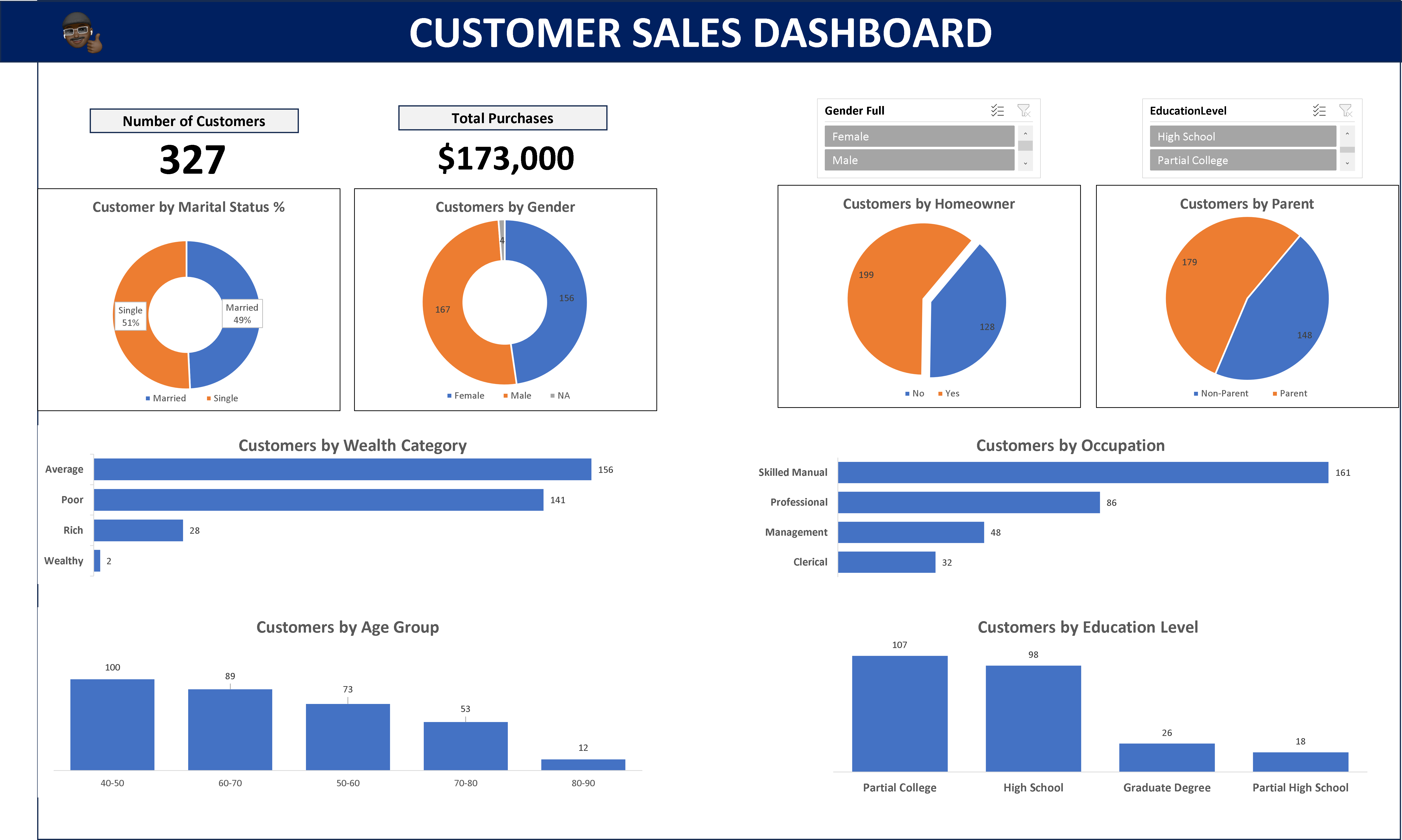
Stakeholders understand data better through visuals and reports. You must know how to present your findings in simple graphs. 

A customer sales dashboard
A dashboard with several visuals of a customer’s purchases for a company.

Tools like PowerBI, Tableau, and Looker are essential for communicating insights to stakeholders who may not understand the underlying code. Because these tools help to craft visually compelling representations that reveal the narrative hidden within the data

4. Statistical Programming Languages

Data analysts use programming languages like Python or R to perform statistical functions or programs within a company’s data. These tools can help you quickly analyze and generate insights from large datasets.  Some of the top programming languages used by data professionals include

  • R
  • Python
  • Java
  • Scala

Soft Skills for Data Analysts

While technical skills are crucial, complementing them with soft skills puts you in a stronger position than an analyst with only hard skills. Here’s a list of soft skills you need as a data analyst in 2023.

  1. Critical thinking.
  2. Problem-solving skills.
  3. Affinity for numbers.
  4. Logical and analytical mindset.
  5. Communication.

Conclusion

  • The data world is evolving, but there are specific tools that you must have at all times.
  • To succeed as a data analyst, you must master spreadsheets, SQL, database management, data cleaning, and visualization.
  • Hard skills are only useful when combined with soft skills. Among the top 5 are communication, critical thinking, problem-solving, numbers affinity, and logical and analytical thinking.
Categories
Getting started Kickstart Software Tech

Crafting Dynamic and Responsive Web Layouts with Bootstrap CSS

In the ever-evolving world of software engineering, creating websites that look and function well across various devices is no longer a luxury; it is a necessity. This is where Bootstrap CSS comes into play. Bootstrap, a popular front-end framework, has revolutionized the way web developers approach responsiveness since its release in 2011.

Bootstrap CSS, alongside other CSS frameworks, such as Tailwind CSS, Foundation, Bulma, Skeleton, etc., has simplified the complexities of creating responsive layouts for websites.

In this comprehensive guide, I will take you on a journey through the fundamentals of Bootstrap and show you how to harness its power to bootstrap stunning and responsive layouts for your web projects.

Bootstrap home

What is Bootstrap?

At its core, Bootstrap is a comprehensive set of HTML, CSS, and JavaScript components and tools designed to simplify web development. It provides developers with a solid foundation upon which to build responsive and visually appealing websites and web applications. Bootstrap’s primary focus is responsive design, ensuring that your website or web application adapts seamlessly to different screen sizes, from the smallest smartphones to the largest desktop monitors.

Bootstrap’s feature set includes a responsive grid system, an extensive library of pre-built UI components, (such as navigation bars, buttons, forms, cards, pagination, badges, navbar, modals, etc.), and a wealth of CSS classes for styling and layout control.

In addition to these components, Bootstrap offers optional JavaScript plugins to improve user interactions and functionality.

Advantages of Choosing Bootstrap

Now that you have a basic understanding of what Bootstrap is, let’s explore why it has become the go-to choice for countless web developers:

1. Rapid Development: Bootstrap significantly accelerates the development process. It provides pre-designed components and a responsive grid system that allows developers to focus on creating content and functionality rather than starting from scratch with every project.

2. Consistency: Bootstrap enforces design consistency throughout your website or application. This is especially valuable when collaborating with multiple developers or designers, as it establishes a common design language and style guide.

3. Responsiveness: With Bootstrap, responsiveness is built-in. Your layouts will automatically adapt to different screen sizes, ensuring a seamless user experience on everything from mobile devices to desktops.

4. Customization: While Bootstrap comes with a sleek default theme, it is highly customizable. You can easily modify its appearance to match your project’s branding or create unique designs using Bootstrap as a foundation.

5. Strong Community and Resources: Bootstrap boasts a vibrant community of developers and a wealth of documentation, tutorials, and third-party themes and plugins. This makes it easy to find solutions to common challenges and stay up-to-date with best practices.

Now that we have scratched the surface of Bootstrap’s capabilities and you have read some of its advantages, let’s delve deeper into the practical aspects of getting started with Bootstrap in the next section.

Getting Started with Bootstrap

Bootstrap offers a quick and straightforward way to include its production-ready CSS and JavaScript in your project without the need for complex build steps.

Here is a step-by-step guide to help you get started:

Bootstrap provides a Content Delivery Network (CDN) that allows you to easily include its CSS and JavaScript files in your project. This means you can get up and running with Bootstrap in no time.

1. Create an HTML file

Start by creating a new index.html file in the root directory of your project. This file will serve as the entry point for your web application.

<!doctype html>
<html lang="en">
  <head>
    <meta charset="utf-8">
    <meta name="viewport" content="width=device-width, initial-scale=1">
    <title>Bootstrap Demo</title>
  </head>
  <body>
    <!-- Your content goes here -->
  </body>
</html>

In this basic HTML template, you just included the essential meta tags for character encoding and responsive behavior. These tags ensure that your web page looks great on various devices, from smartphones to desktops.

2. Include Bootstrap’s CSS

Include Bootstrap’s CSS to style your web page by placing the <link> tag in your HTML document’s <head> section.

This <link> tag references Bootstrap’s CSS file from the CDN, ensuring that your web page is styled according to Bootstrap’s design principles.

<!doctype html>
<html lang="en">
  <head>
    <meta charset="utf-8">
    <meta name="viewport" content="width=device-width, initial-scale=1">
    <title>Bootstrap Demo</title>
    <link href="<https://cdn.jsdelivr.net/npm/bootstrap@5.2.3/dist/css/bootstrap.min.css>" rel="stylesheet" integrity="sha384-rbsA2VBKQhggwzxH7pPCaAqO46MgnOM80zW1RWuH61DGLwZJEdK2Kadq2F9CUG65" crossorigin="anonymous">
  </head>
  <body>
    <!-- Your content goes here -->
  </body>
</html>

3. Include Bootstrap’s JavaScript

To make use of Bootstrap’s interactive components and functionality, including its JavaScript, place the <script> tag for Bootstrap’s JavaScript bundle just before the closing </body> tag of your HTML document.

<!doctype html>
<html lang="en">
  <head>
    <meta charset="utf-8">
    <meta name="viewport" content="width=device-width, initial-scale=1">
    <title>Bootstrap Demo</title>
    <link href="<https://cdn.jsdelivr.net/npm/bootstrap@5.2.3/dist/css/bootstrap.min.css>" rel="stylesheet" integrity="sha384-rbsA2VBKQhggwzxH7pPCaAqO46MgnOM80zW1RWuH61DGLwZJEdK2Kadq2F9CUG65" crossorigin="anonymous">
  </head>
  <body>
    <!-- Your content goes here -->
    <script src="<https://cdn.jsdelivr.net/npm/bootstrap@5.2.3/dist/js/bootstrap.bundle.min.js>" integrity="sha384-kenU1KFdBIe4zVF0s0G1M5b4hcpxyD9F7jL+jjXkk+Q2h455rYXK/7HAuoJl+0I4" crossorigin="anonymous"></script>
  </body>
</html>

By including this <script> tag, you are not only adding Bootstrap’s JavaScript but also Popper, a library used for positioning dropdowns, popovers, and tooltips. This ensures that your Bootstrap components function correctly.

4. Optional: Include Popper and Bootstrap JavaScript Separately

If you do not plan to use dropdowns, popovers, or tooltips, you have the option to include Popper and Bootstrap JavaScript separately. This can help save some kilobytes by not including Popper when it is unnecessary.

<script src="<https://cdn.jsdelivr.net/npm/@popperjs/core@2.11.6/dist/umd/popper.min.js>" integrity="sha384-oBqDVmMz9ATKxIep9tiCxS/Z9fNfEXiDAYTujMAeBAsjFuCZSmKbSSUnQlmh/jp3" crossorigin="anonymous"></script>

<script src="<https://cdn.jsdelivr.net/npm/bootstrap@5.2.3/dist/js/bootstrap.min.js>" integrity="sha384-cuYeSxntonz0PPNlHhBs68uyIAVpIIOZZ5JqeqvYYIcEL727kskC66kF92t6Xl2V" crossorigin="anonymous"></script>

In our example, we will not be using Popper, as we are only interested in the grid system provided by Bootstrap for a responsive layout.

Your HTML file should look like this (without Popper):

<!doctype html>
<html lang="en">
  <head>
    <meta charset="utf-8">
    <meta name="viewport" content="width=device-width, initial-scale=1">
    <title>Bootstrap Demo</title>
    <link href="<https://cdn.jsdelivr.net/npm/bootstrap@5.2.3/dist/css/bootstrap.min.css>" rel="stylesheet" integrity="sha384-rbsA2VBKQhggwzxH7pPCaAqO46MgnOM80zW1RWuH61DGLwZJEdK2Kadq2F9CUG65" crossorigin="anonymous">
  </head>
  <body>
    <!-- Your content goes here -->
    <script src="<https://cdn.jsdelivr.net/npm/bootstrap@5.2.3/dist/js/bootstrap.min.js>" integrity="sha384-cuYeSxntonz0PPNlHhBs68uyIAVpIIOZZ5JqeqvYYIcEL727kskC66kF92t6Xl2V" crossorigin="anonymous"></script>
  </body>
</html>

With these steps, you have successfully set up Bootstrap in your project, allowing you to take advantage of its responsive grid system and pre-designed UI components. In the upcoming sections of this article, we will explore how to leverage Bootstrap’s features to create stunning, responsive layouts for your web projects.

Creating Responsive Layouts with Bootstrap

This flexible and powerful system uses a combination of containers, rows, and columns, all built with the power of Flexbox, to help you achieve pixel-perfect alignment and responsiveness across a wide range of devices and screen sizes.

Bootstrap Grid System

Understanding the Bootstrap Grid System

Before we delve into the specifics, let’s understand the fundamental components of the Bootstrap grid system:

  • Containers: Containers provide the outermost wrapper for your content. They help center your content and provide padding on the left and right sides. Bootstrap offers both fixed-width (container) and full-width (container-fluid) containers.
  • Rows: Rows are used to contain and clear a set of columns. They ensure that columns align well and do not overlap. Rows are placed inside containers.
  • Columns: Columns are the building blocks of your layout. You can specify how many columns each element should span, and Bootstrap will take care of the rest. Columns are placed inside rows.

Now, let’s explore some practical applications of this grid system.

Auto-layout Columns

Bootstrap offers a variety of ways to create responsive columns without the need for explicit numerical classes like .col-sm-6. These auto-layout columns adapt automatically to different screen sizes.

Equal-width Columns

You can create equal-width columns that apply to every device and viewport, from extra-small (xs) to extra-extra-large (xxl). Add unit-less classes to specify how many columns you need, and Bootstrap ensures that each column is of the same width.

<div class="container text-center">
  <div class="row">
    <div class="col">
      1 of 2
    </div>
    <div class="col">
      2 of 2
    </div>
  </div>
  <div class="row">
    <div class="col">
      1 of 3
    </div>
    <div class="col">
      2 of 3
    </div>
    <div class="col">
      3 of 3
    </div>
  </div>
</div>


In the example above, we have two rows, each containing equal-width columns. Whether on a large desktop screen or a mobile device, these columns will adjust automatically to occupy the available space evenly.

Bootstrap example - Equal-width Columns

Setting One Column Width

Bootstrap’s auto-layout for flexbox grid columns allows you to set the width of just one column, and the sibling columns will automatically resize around it. You can achieve this using predefined grid classes, grid mixins, or inline widths.

<div class="container text-center">
  <div class="row">
    <div class="col">
      1 of 3
    </div>
    <div class="col-6">
      2 of 3 (wider)
    </div>
    <div class="col">
      3 of 3
    </div>
  </div>
  <div class="row">
    <div class="col">
      1 of 3
    </div>
    <div class="col-5">
      2 of 3 (wider)
    </div>
    <div class="col">
      3 of 3
    </div>
  </div>
</div>

In this example, the second column is explicitly set to be wider (col-6 and col-5, respectively), and the other columns adjust their widths accordingly. This flexibility makes it easy to create complex layouts that adapt beautifully to various screen sizes.

Bootstrap example - Setting One Column Width

Wrapping Up

Bootstrap is generally considered an opinionated library, which means it has a set of assumptions and guidelines for building responsive and mobile-first web applications. While it offers a wide range of customizable components and tools, it is designed to be used in a specific way to achieve consistent and predictable results.

Using Bootstrap to quickly bootstrap your web development project sets you one step ahead and brings you closer to completing your development in no time. This is because you no longer have to worry about the hard parts, such as stylings, responsiveness, components, etc. because Bootstrap takes care of those.

In this article, walked through setting up Bootstrap in your web project. By embracing Bootstrap, you not only save time but also ensure your projects look exceptional on screens of all sizes, thus enabling you to build mobile-friendly websites.

Further Readings

Video Tutorials

Bootstrap Tutorial - YouTube
Bootstrap Grid System Tutorial | Bootstrap 5 - YouTube
Bootstrap 5 Crash Course Tutorial #1 - Intro & Setup - YouTube
Categories
General Software Team Management Tech

The Software Development Lifecycle

Picture a gourmet chef in a kitchen: his ingredients arranged atop a wooden table, apron firmly girded around his torso and neck, hands on a sharp-edged knife chopping a piece of steak with dexterity.

Without a doubt, he knows the right amount of seasoning he needs in preparing a sumptuous meal.


The Tech Industry functions in the same way, but with a different terminology. In order to build software that will solve everyday problems in the world, Software Engineers implore a recipe called: The Software Development Life Cycle (SLDC).

In this article, I’ll take you through the intriguing world of SLDC.

What is the Software Development Lifecycle?

Various tech organizations and blogs have provided different definitions of the Software Development Life Cycle (SDLC).

According to AWS, it is a methodical and resource-efficient approach employed by development teams to conceive, create, and deliver top-notch software within a defined time and budget constraint.

On the other hand, GeeksforGeeks defined it as a well-structured and systematic process employed to conceive, craft, and test good quality software.


Drawing from these perspectives, I’ll interpret the Software Development Life Cycle as a systematic approach employed by development teams to plan, design, build, and thoroughly test software and its related products.

Phases Involved in Software Development Lifecycle

A typical Software Development Life Cycle run through the following stages:
· Planning
· Requirement gathering and analysis
· Designing the product architecture
· Development
· Product testing and integration
· Deployment and maintenance of products


Planning
This is the beginning of the cycle, where project goals, objectives, requirements, and budget are discussed. Inputs are collected from various stakeholders who have a vested interest in the project. The team at this stage determines the feasibility of the project and how they can implement it with minimum risk.

Requirements Gathering and Analysis
All the requirements for the project are specified. The different goals and objectives outlined in the planning stage are collated into clear requirements for the development team. The team uses the collected data to create a formal working document known as a Software Requirement Specification (SRS) document. After this document has been reviewed and approved by stakeholders, it serves as a guide throughout the designing and development process.


Designing the Product Architecture
During this stage, the Software Requirement Specification (SRS) document is translated into design designers create and test several designs and ideas before selecting the final prototype to the team an idea of what the product will look like, and make changes, without having to write code.


Development
The development phase divides tasks in the project into modules and assigns them to the different programmers in the team. In this phase, the software requirements outlined in the project are translated into code, using the chosen programming language. This phase is usually the longest phase of the Software Development Life Cycle Process.


Product Testing and Deployment
At this stage, several tests like unit testing, acceptance testing, integration testing, etc. are carried out to ensure the product solves the needs outlined in the requirements. The Quality Assurance team usually does this. The developers fix any bug reported by the QA team, and the product is tested again, till the software is free of bugs. After passing through this rigorous process, the product is ready for deployment.

Maintenance
This phase ensures the software continues to run as it is intended to. In this stage, the team resolves customer issues, fix bugs, monitor the performance of the software, and identifies new ways to improve the user experience.

The SDLC process may restart to release an update to the software.

Conclusion

By following this systematic journey through planning, design, development, testing, deployment, and maintenance, development teams can deliver high-quality software that meets user needs and adheres to project constraints.


Categories
General News Software Tech Techrity Programmes

The Build4SocialGood Hackathon Programme

techrity build for social images
techrity build for social good image

Inspire. Coach. Build

The Build4SocialGood Hackhaton brings together developers and techies yearly from all over Africa to develop ideas and build targeted software products for solving sustainable development goals.

Social good is an action that defines some sort of benefit to the general public. Our continent; Africa is laden with a myriad of social good problem which Technology can help to mitigate. We’re looking at building these software which would be managed by the community. Techrity encourages you to #Build4SocialGood and for the #Community. These projects will be managed and open sourced by the community and Winners of the challenge will go ahead to enhance their MVP and solutions in the incubation programme.

Are you passionate about applying your skills for social good, but no funds to kickstart it? Participate in our #Build4SocialGood Hackathon and get a chance to fund your ideas/startup. Hackathon winners will have access to hub support to assist them in their unique innovations. 

#Build4SocialGood Hackathon identify specific challenges for teams to build and provide solutions for social good problems. 

Hackathon participants also get access to mentors to support and direct them during the hackathon phase. 

Come join us, learn new skills, and build functioning prototypes to solve those challenges.

How to join our hackathon challenge

Call for team applications will be announced on the Techrity Build4SocialGood website. Teams will be selected based on merit and inclusivity.

Winners will go ahead to win the prize money and qualify for the incubation program.

Steps

Follow the steps below to register your team.

Step 1: Submit an Application

Visit https://techrity.org/register/hackathon to register your team.

Step 2: Receive a confirmation mail

The #Build4SocialGood team would send a mail outlining next steps.

Step 3: Join the Slack Channel

Prizes

Prizes will be announced in due course.

About Us

Techrity Logo

Techrity, is a non-profit social enterprise, a community of people contributing to advance humanity through their time, money and skills. We believe in the power of using technology for sustainable human capital advancement. We’re all about inspiring the youth to take up careers in tech, through our Mentorship and Kickstart programs, we are also committed to solving social good problems using tech through our Build4SocialGood program.

At Techrity, we believe your donates open doors of opportunities for everyone including the donor, receiver, this creates a circle of givers paying it forward for technology.

Your donation plants seeds of kindness in others, and this promotes a world of revolving kind-hearted people. Help learners get laptops and data to kickstart and make their journey in tech a success.

We encourage you to donate to fund any of our programmes as mentioned. Visit the Techrity Donation page to help someone kickstart their tech career today!.

Organizations, startups etc, can fund a hackhaton programmes and get their ideas tested and developed by our community.


To find out more about what we have in store for our partners, please fill the contact form and we will get back to you in no time.

Thanks.


Categories
General Software Tech Techrity Programmes

Techrity Kickstart Program

The future of tech is now

Our Kickstart focuses on the orientation, growth, and development of her beginners looking to take up Tech careers. With our Kickstart program, you get access to a mentor who guides you through your Tech journey, that is, you get automatic access to our free mentorship program. You also get an opportunity to be featured as a Techrity Top Learner on our blog and get a chance to impact the skills learned to others by joining our mentorship program.

Techrity Kickstarters get access to;

Data Support

Donate data or cash to support a Techrity kickstarter.

Laptop Support

Donate a laptop or fund a kickstarter

Mentorship Support

Our Kickstarters get access to a community of mentors to guide them through their learning journey.

Simple Steps to kickstart

Who gets selected?

When you register for the Kickstart program, you will be required to take a short assessment to determine your competency level and area of placement.

Techrity is transparent and will only attend to individuals who signs of dedication and willingness to be mentored.

What’s the selection process?

  1. Fill the Kickstart registration form
  2. Receive an invite link to the slack channel
  3. Join the kickstart channel and take the foundation courses
  4. Get the foundation certificate
  5. Get connected to a mentor

Ready to start?

Apply to be a Kickstarter. Visit the Kickstart page.

About Us

Techrity Logo

Techrity, is a non-profit social enterprise, a community of people contributing to advance humanity through their time, money and skills. We believe in the power of using technology for sustainable human capital advancement. We’re all about inspiring the youth to take up careers in tech, through our Mentorship and Kickstart programs, we are also committed to solving social good problems using tech through our Build4SocialGood program.

At Techrity, we believe your donates open doors of opportunities for everyone including the donor, receiver, this creates a circle of givers paying it forward for technology. 

Your donation plants seeds of kindness in others, and this promotes a world of revolving kind-hearted people. Help learners get laptops and data to kickstart and make their journey in tech a success.

We encourage you to donate to fund any of our programmes as mentioned. Visit the Techrity Donation page to help someone kickstart their tech career today!.

Organizations, startups etc, can fund a hackhaton programmes and get their ideas tested and developed by our community.


To find out more about what we have in store for our partners, please fill the contact form and we will get back to you in no time.

Thank you!

Categories
General News Social Software Tech Techrity Programmes

Techrity Mentorship Program

We create amicable interactions between mentor’s & mentee’s

Our mentorship program connects people who have specific skills and knowledge (mentors) with individuals (proteges) who may need these same skills to increase in their skillset. 

We are continuously seeking like-minded individuals, collaborators, and mentors that share our values and believes in “Paying it Forward”. Join our mentorship network and use your knowledge to serve humanity. 

Top Mentors are entitled to a Mentorship badge and a weekly feature on our blog and social media platforms and a #TechrityMentorFocus podcast.

Come join Techrity. Spread kindness and goodwill by mentoring someone. Techrity would be glad to have you as a mentor!!!

Mentees

We imbibe an “Everyone is Someone” culture. We pay close attention to our mentees and ensure they learn in a safe and progressive environment. 

Outstanding Mentees would be showcased on the Techrity Website and will submit a dedicated blog post to share your experience so others can be motivated.

Our successful mentees are encouraged to pay it forward by joining the mentors to mentor other learners.

Join Our Mentorship Team

Register to be a Techrity Mentor! Our seasoned Mentors are compensated with a mentorship badge and #TechrityMentorFocus monthly podcast. We believe mentors deserve the recognition for the time and effort they put into imparting knowledge.

Visit the Mentorship page to get started.

About Us

techrity_mentor_image
Techrity Logo

Techrity, is a non-profit social enterprise, a community of people contributing to advance humanity through their time, money and skills. We believe in the power of using technology for sustainable human capital advancement. We’re all about inspiring the youth to take up careers in tech, through our Mentorship and Kickstart programs, we are also committed to solving social good problems using tech through our Build4SocialGood program.

At Techrity, we believe your donates open doors of opportunities for everyone including the donor, receiver, this creates a circle of givers paying it forward for technology. 

Your donation plants seeds of kindness in others, and this promotes a world of revolving kind-hearted people. Help learners get laptops and data to kickstart and make their journey in tech a success.

We encourage you to donate to fund any of our programmes as mentioned. Visit the Techrity Donation page to help someone kickstart their tech career today!.

Organizations, startups etc, can fund a hackhaton programmes and get their ideas tested and developed by our community.


To find out more about what we have in store for our partners, please fill the contact form and we will get back to you in no time.

Thank you!